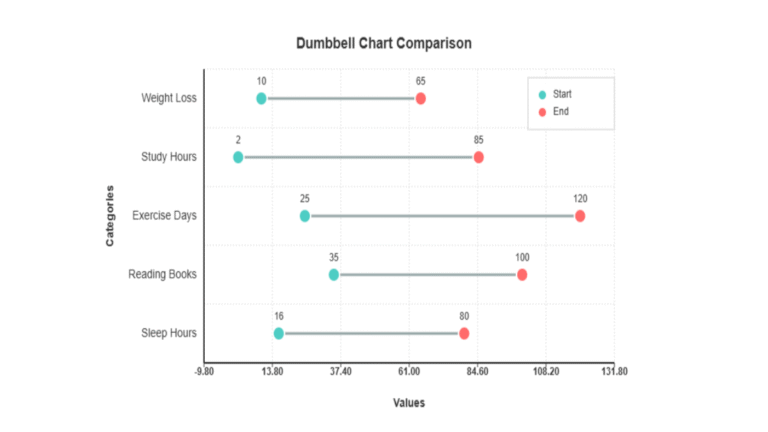
Dumbbell Chart Generator
Create beautiful dumbbell charts to compare changes between two points. Upload your data or use sample datasets, customize the visualization, and download your results.
Chart Labels
Chart Options
Data Input & Management
Data Points
Enter your categories and their start/end values. Each row represents one dumbbell.
Generate Chart
Download Options
Generating chart...
Statistical Summary
Analysis Results
Detailed Results
Generate a chart to see detailed results.
Interpretation
Generate a chart to see interpretation.
Download Your Analysis Report
Generate a comprehensive PDF report with the dumbbell chart, detailed results, and interpretation.
Did you know that people process visual information 60,000 times faster than they process text? This fact changed how I presented the data. Large spreadsheets confuse and overwhelm users.
Free online data visualization tools can change this. They convert numbers into clear stories. I have tried many to find the best
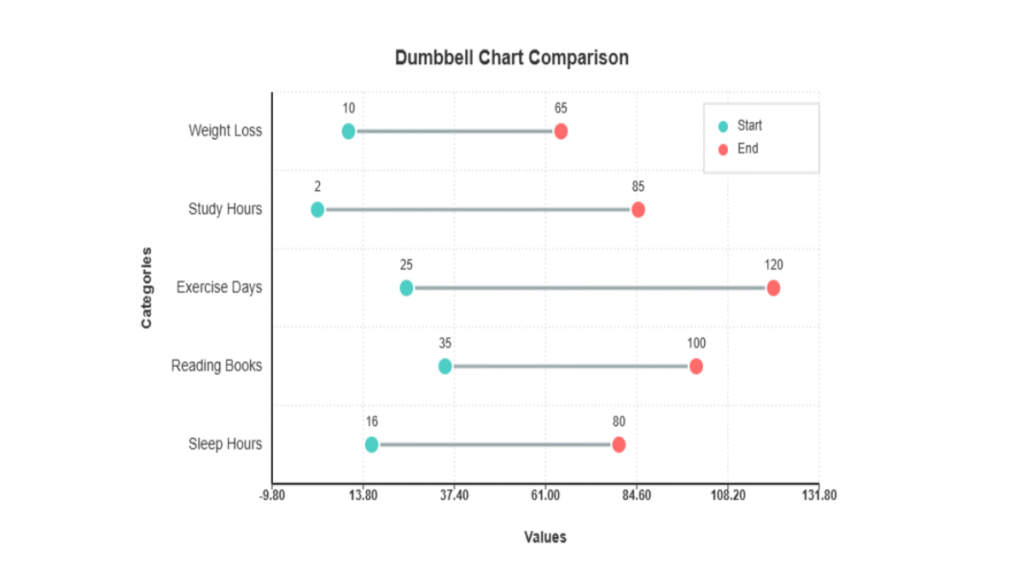
Creating dumbbell chart generator online free visualizations changed how I displayed changes. These visuals make it easy to observe the differences. Your audience will understand it quickly.
Web-based chart creation tools are user-friendly. There is no need for expensive software or coding. Eco R Stats is great for stats. It is easy to use and has excellent features.
In this guide, I share what I have learned. You will learn to make data easy to understand. This helps in making better choices.
Key Takeaways
- Visual data gets processed 60,000 times faster than plain text, making visualization tools essential for effective communication
- Free web-based platforms eliminate the need for expensive software or programming knowledge
- These visualizations excel at showing comparisons between two time periods or different groups
- Eco R Stats provides professional-grade statistical visualization capabilities without cost barriers
- Complex spreadsheet data becomes instantly understandable through proper visual representation
- Modern tools make professional-quality visualizations accessible to everyone regardless of technical skill level
1. What I Need to Know About Dumbbell Charts
While exploring data visualization, I found that dumbbell charts are great for comparisons. They clearly show the differences between the two points.
A dumbbell chart resembles fitness equipment. It has two markers and one line. This design is both powerful and simple.
The Building Blocks of Visual Comparison
Understanding the basics of the dumbbell plot is key. A chart has three main components.
First, there are two markers for the start and end of the process. These can be time periods or groups of time.
The line connects the markers. This shows the extent of change. I can see if the values increase, decrease, or remain the same.
The third part is the categorical axis. It organizes comparisons. Tools like Eco R Stats make this part precise.
What Makes These Charts Work So Well
Several factors make data comparison chart makers effective. Visual clarity is the biggest advantage.
These two markers attracted my attention. Colors indicate whether the changes are positive or negative.
Keeping the scales the same helps to compare accurately. This avoids confusing visualizations.
These charts save space. They show many comparisons without being overly crowded.
Standing Apart from Traditional Comparison Methods
Dumbbell charts differ from other types of charts. A comparative data analysis tool helps in choosing the best format.
Bar charts require more space and effort. I must mentally compare two bars.
Line graphs are good for trends but messy for discrete comparisons. They suggest a connection that may not exist.
Scatter plots show relationships but not paired value connections. Dumbbell charts clarify these connections.
| Chart Type | Space Efficiency | Comparison Clarity | Best Use Case |
|---|---|---|---|
| Dumbbell Chart | High | Excellent for two-point comparisons | Before-after analysis, gap analysis |
| Grouped Bar Chart | Medium | Good but requires more space | Multiple category comparisons |
| Line Graph | High | Best for continuous trends | Time series with many data points |
| Scatter Plot | Medium | Shows correlation not change | Relationship analysis between variables |
2. Why I Choose Dumbbell Charts for Data Comparison
I like dumbbell charts for data comparison because they are more than pretty graphs. They help solve major communication problems. Our brains can only handle 3-5 chunks of information at a time. This makes it difficult to obtain tables quickly.
Switching to a dumbbell chart maker helped significantly. Now, my audience gets insights quickly without getting lost in the numbers.
Seeing Changes at a Glance
Dumbbell charts are useful for demonstrating changes. The two dots and line tell me right away if there is a big change or not. Last month, I converted a hard table into a dumbbell chart for test scores.
My team could see which groups improved the most easily. This made our meeting 20 min shorter because everyone received the data quickly.
Communicating the Story Behind the Numbers
The line in the dumbbell charts catches my eye, showing how big the change is. I once looked at the uninsured rates in Maricopa County, Arizona. The charts show patterns that are difficult to see in tables.
These charts show both the values and the differences between them. This makes them highly informative. I even found data issues that were difficult to spot in other formats.
Maximizing Space Without Losing Impact
I like how I can make many comparisons in one place. Many bar charts can fit in one dumbbell chart. Using Eco R Stats is helpful in creating these charts.
Dumbbell charts are clear, show good changes, and save space. They are my top choices for reports and dashboards.
| Advantage | Traditional Tables | Dumbbell Charts | Impact on Understanding |
|---|---|---|---|
| Processing Speed | Slow (requires reading each cell) | Instant (visual pattern recognition) | 3x faster comprehension |
| Change Magnitude | Mental calculation needed | Visual line length shows difference | Immediate insight into significance |
| Space Efficiency | Expands with more data points | Compact vertical stacking | 50% less space required |
| Pattern Detection | Difficult with multiple rows | Visual trends emerge naturally | Reveals hidden insights quickly |
3. When I Should Use a Dumbbell Plot Maker
The choice of dumbbell plots depends on the data and the story to be told. Knowing when to use a comparison data plotting tool is as important as knowing how to use it. These plots are great when I have paired data points that show a compelling story of change or difference.
I use a dumbbell plot maker when comparing two different measurements for the same thing. This could be sales from January to December, employee satisfaction scores before and after a change, or demographic statistics from two census periods.
Perfect Scenarios for Dumbbell Chart Visualization
There are many times when an online data comparison chart is the best choice. The most powerful use is when I must compare many categories simultaneously. For example, I used one to show how different departments performed better over six months.
When creating dumbbell plots, I look for a few key things:
- Two related data points per category: Like pre-test and post-test scores, or beginning and ending values
- Same measurement scale: Both values should have the same units, like percentages or dollars
- Change visualization needs: The difference between points is more important than the actual values
- Multiple simultaneous comparisons: I’m tracking several entities or groups at once
Examples include comparing life expectancy between 1960 and 2018 across countries. I have also shown uninsured rates across different groups over time and learning outcomes from different educational methods.
Industries and Use Cases Where I Apply Them
In healthcare, I compare patient outcomes before and after treatment. The visual I have used this tool in many fields. Clarity helps medical teams spot improvement patterns quickly.
In education, dumbbell charts are useful for showing learning gains from different teaching methods. I have created visualizations comparing test scores from various classroom conditions. Educators can quickly determine which methods are most effective.
I use all of them for business analytics. They are good for comparing financial performance, pricing changes, or market share shifts. I have used them to show currency value changes, budget allocations, and sales metrics.
In social research, they are useful for showing demographic changes, survey response differences, and policy impacts. Sports analytics is another area where they are invaluable for comparing team or player statistics across seasons.
When I need to make these visualizations professionally, Eco R Stats is ideal. It offers the stats and visualization tools I need to make charts that are ready for publication.
4. How I Find the Best Dumbbell Chart Generator Online Free
I have tried many free tools and know what makes them great. The best tools make data projects easy. I look for practical features that help when time is limited.
Essential Features I Look for in Free Tools
I require tools that can handle various data types. They should work with CSV files, Excel, and manual entries. It is important that they do not limit my data size.
The ability to customize is crucial. I want to change the marker styles, line colors, and labels. True customization allows me to create charts that are just right.
The ability to export charts in various formats is important. I need PNG for slides, SVG for papers and PDF for reports. Any tool that limits these options is not suitable for me.
Comparing Free Online Data Visualization Tools
I evaluate tools in five areas. One of these is their ease of use. I want to create charts quickly.
Their appearance is another factor. I want the charts to look professional. The ability to use them on any device is also important. They must keep my data safe.
It is difficult to find tools that are truly free. Many seem free but charge for the key features. Eco R Stats is different. It offers all the features without any cost.
What Makes a Great Dumbbell Chart Maker
Great tools have easy-to-use templates that are user-friendly. They allowed me to observe changes immediately. Accessibility features ensure that everyone can see my charts.
Good tools have clear guidelines and examples. I prefer tools that do not require too much information. Eco R Stats is my top choice. It is great for both appearance and analysis.
5. My Complete Guide to Preparing Data for Dumbbell Charts
I have learned that good data preparation makes charts clear. Before using tools, I organize my data. This saves time and makes charts work immediately.
Clean, organized data are key to good charts. I follow the steps that work for all the tools. This makes my charts look great, regardless of the software.
How I Organize My Dataset Structure
I use a special order for my data collection. This facilitates error-free import.
The first column contains the category names. These are labels, such as product names or places. I have kept them short and clear.
The second column lists the starting values. This is the first point of comparison.
The third column shows the ending values. This is the second point of comparison.
| Category Name | Starting Value | Ending Value | Position Coordinate |
|---|---|---|---|
| Control Group | 45 | 52 | 1 |
| Test Group A | 48 | 67 | 2 |
| Test Group B | 43 | 71 | 3 |
| Test Group C | 50 | 58 | 4 |
If I need to control the spacing, I add a fourth column. This helps to arrange the chart.
Data Formatting Requirements I Always Follow
The correct formatting prevents import errors. I have a checklist for every upload that I follow.
Numeric values must be numbers and not text. I check this by seeing if they align correctly in cells. Text numbers can cause errors.
I removed all special characters and symbols from the numbers. I will add these later in the chart design.
Category names should be short and clear. Long labels are difficult to read. I aim for 2-4 words.
Both comparison values must have the same units and scale. The mixing of units makes the charts confusing.
I removed all empty cells. If data are missing, I fill it or remove the row. Empty cells fail to import.
Consistency is the key. If percentages are shown, all values should match the format.
Common Data Preparation Mistakes I Avoid
I have learned from my mistakes. These are the errors I caught early.
Mixing data types in a column is a major error. Numbers and text should not be mixed. I have kept the types consistent.
Inconsistent decimal places look bad. If one value has 45.67, all values should have two decimal places.
Summary rows or totals in the main dataset confuse the tools. I calculated these separately and added them manually.
Hidden characters and extra spaces cause errors in the text. Trim functions were used to remove these issues.
The worst mistake was swapping the start and end value columns. I now double-check the column order before importing.
When using platforms such as Eco R Stats, I check their import needs. However, these general tips work with any tool.
6. How I Create Dumbbell Charts Using Eco R Stats
I use Eco R Stats to create professional dumbbell charts quickly. It is easy to use, even if the user does not know how to code. This tool is excellent for both novices and experts.
It is perfect for anyone who wants to show data comparisons. It is also great for projects that require both statistics and visuals.
Getting Started with the Eco R Stats Platform
Starting with Eco R Stats was easy. It can be used from any browser without downloading anything. This saves time and avoids technical problems.
Signing up takes only a minute. You provide some basic information and receive full access immediately. Unlike many tools, Eco R Stats does not hold back features for pay.
Once you are in, the dashboard is simple. It has tools that are organized by type. You go to the Data section to find chart options. The platform assists you with each step, so you do not get lost in technical jargon.
Navigating the Interface and Tools
The steps are logical and easy to follow. First, you add your data. You can upload CSVs, Excel files, or enter them manually. The system checks the data and informs the user of any problems.
Then, you pick a dumbbell chart template. The interface shows the data on one side and the settings on the other. You can easily move variables to the start and end points.
As you change the settings, you can see the changes immediately. This helps you make decisions quickly. You can change the colors, labels, and more without switching screens.
The platform also has customizable templates. These are great when you are in a hurry or need ideas for designs.
Why I Recommend Eco R Stats for Statistical Visualization
I keep returning to Eco R Stats for many reasons. It combines statistics and visuals well. You can perform data checks, confidence intervals, and tests right where you create your charts.
It is free without any limits or watermarks. Your charts look professional and clean without any tool branding. Many tools add logos or limit exports unless users pay more.
Community support is also a big plus. If you have questions or need help, the forum will quickly respond. The team also added new features based on user feedback.
| Feature | Eco R Stats | Basic Chart Tools | Advanced Coding Platforms |
|---|---|---|---|
| Learning Curve | Low – intuitive interface | Very Low – limited options | High – requires programming |
| Statistical Capabilities | Advanced R-based analysis | Basic calculations only | Full statistical power |
| Cost | Completely free | Free with limitations | Free but time-intensive |
| Customization Options | Extensive through the GUI | Limited presets | Unlimited through code |
| Export Quality | Professional without watermarks | Often watermarked | High-quality output |
Eco R Stats is perfect for anyone serious about data comparison. It offers excellent results without the need to spend weeks learning the code. It is the best mix of power and ease for anyone.
7. Step 1: How I Select and Access My Dumbbell Chart Generator
First, I selected a tool for my dumbbell chart project. This choice affects everything, from data preparation to customization. Taking time here saves a lot of trouble later on.
I consider what I need for my project and how tech-savvy I am. I think about whether I need a one-off chart or ongoing visuals. In addition, if my audience needs to interact with the chart.
Choosing the Right Free Visualization Tool for My Needs
When picking a dumbbell chart generator online, I consider three key questions. What is my technical skill level? Do I want static or interactive charts? Will I create just one or many charts?
I often choose Eco R Stats for its ease and power. However, Excel is great for quick charts in spreadsheets. For web applications, JavaScript libraries such as Highcharts are used.
I started by determining my main goal. For a detailed analysis, Eco R Stats is my preferred choice. Excel is effective for simple reports.
| Tool Feature | Eco R Stats | Excel | Highcharts |
|---|---|---|---|
| Ease of Use | Intuitive interface for beginners | Moderate learning curve | Requires coding knowledge |
| Interactivity | Built-in hover effects and filters | Limited interactive options | Fully customizable interactions |
| Statistical Integration | Advanced analysis tools included | Basic statistical functions | No statistical capabilities |
| Export Quality | Publication-ready formats | Standard image exports | Web-optimized outputs |
| Cost | Free with full features | Requires Microsoft license | Free for non-commercial use |
Setting Up My Account and Workspace
After choosing my free dumbbell plot creator, I set up an account. For Eco R Stats, I used my email to create a free account. This allows me to save projects, share, and access more features.
The workspace was then explored. I find where to import data, customize it, and export it. This step helped avoid confusion when working with the data.
I organize my work into dedicated folders. This keeps everything tidy and makes it easy to find charts.
Understanding the Tool’s Capabilities and Limitations
I first tested my dumbbell chart generator free with a small dataset. This shows how it handles data, customization, and export quality.
Eco R Stats has lots of features for complex data and customization. It also exports reports well. However, it requires Internet access.
I note important details, such as data size limits and file formats. Knowing these helps me plan my project and set expectations.
8. Step 2: How I Import and Structure My Data
First, I selected a tool to work with. Subsequently, I carefully loaded the data. This step is key to avoiding problems later.
The quality of my chart is affected by how well I prepare my data. Every tool is different, but the basics remain the same. I ensure that my data is clean and ready before I start.
Choosing the Right Input Method for Your Situation
Different situations require different methods for inputting data. The choice depends on the data size and source. Most tools offer several options to meet different needs.
For large datasets or data from other systems, files are uploaded. This is best when I have spreadsheets or database exports. This saves time and avoids mistakes.
For small datasets, the data were entered manually. This gives me full control and is great for quick charts. It is perfect for simple charts or when only a few points are required.
Some tools, such as Eco R Stats, connect to databases or pull data from URLs. I use these for data that changes often and needs to be updated.
Working with CSV, Excel, and Direct Entry
Each method of inputting data requires special care. I have learned how to do it correctly for each method.
When uploading CSV files, I check for standard delimiters and quotes around the commas. I also ensured that the file used UTF-8 encoding to avoid display issues.
Excel uploads also require attention. I uploaded the correct sheet and removed the formatting and formulas that could interfere with the import.
For manual entry, I carefully used the platform’s editor. I check each value as I type to identify mistakes. Having a reference document open helps me remain accurate and fast.
In Eco R Stats, the import interface helps to map the fields clearly. I specify which column has my categories and values: This step is crucial for creating accurate, interactive statistical charts.
| Input Method | Best For | Key Advantages | Important Considerations |
|---|---|---|---|
| CSV Upload | Medium to large datasets, automated exports | Fast processing, universal compatibility, easy automation | Check delimiter format, ensure proper text encoding, verify comma handling |
| Excel Upload | Formatted business data, multi-sheet workbooks | Preserves column structure, handles multiple data types, familiar format | Remove formulas and formatting, select correct worksheet, verify cell types |
| Manual Entry | Small datasets, quick visualizations, testing concepts | Complete control, no file preparation, immediate feedback | Time-consuming for large datasets, higher error risk, requires careful proofreading |
| Database Connection | Live data, regularly updated information, enterprise systems | Real-time updates, no manual uploads, consistent data source | Requires technical setup, needs proper credentials, may have security restrictions |
Checking Your Data Before Chart Creation
Validation is key to avoiding bad charts. I never skip this step. This has saved me from making many mistakes.
After importing, the data were checked in the platform’s preview pane. I ensure that all numbers are numbers and not text. This is important for the correct functioning of the chart.
I also checked if all rows were imported and if the count matched my file. Missing rows can change the story of the chart. I searched for null values or blank cells that might cause gaps.
Checking the data range was also important. I ensure that the values are what I expect. If they are not, something went wrong during the import.
Category names require special attention. I ensure that they are displayed correctly without any problems. Clear labels are essential for effective web-based charting.
I performed the following specific validation checks before proceeding:
- Confirm that start values are actually lower than end values (or vice versa, depending on my intention)
- Check for duplicate category names that might cause confusion
- Verify that date formats converted correctly if I’m working with time-based data
- Ensure percentage values are in the correct decimal format (0.25 vs 25)
- Look for outliers that might skew my chart scale inappropriately
This validation takes only a few minutes. However, these minutes save hours of trouble later. Catching import errors early makes chart creation smooth.
After validation, I was ready to move on. My data are solid, and I can create effective charts that clearly show my message.
9. Step 3: How I Configure My Dumbbell Chart Settings
Now that I have my data ready, I set up the chart settings as follows. This makes the data easy to see and understand. I focused on three key areas to make my dumbbell chart work well.
In Eco R Stats, setting up is easy once I know how it works. I opened the settings panel. There, I connected my data to the chart parts. This was the start of creating my chart.
Mapping My Data Points Correctly
I select the data points as the start and end. These points form each dumbbell. When I create dumbbell plots, I use the “before” values for the first dot and “after” for the second.
I check the preview as I choose the options. It is important to obtain the correct answer. If I am comparing 2020 to 2024, 2020 should be the start.
Organizing Categories Effectively
Then, I decide which column has the category labels. These labels show what I am comparing. My data comparison chart maker requires these labels to organize the charts correctly.
I consider how many categories to display simultaneously. Too many make the chart messy. I use filters or create additional charts if necessary.
When I have grouped data, I choose how to show them. The comparison data plotting tool allows me to stack or arrange categories as needed.
Establishing Structure and Layout
The final step was to select the chart orientation. I chose vertical for short labels. For longer labels, the horizontal orientation is better.
The proximity of the dumbbells affects the ease of reading. The text is difficult to read when too close. Too far wastes space.
Eco R Stats has good preset options. However, I can adjust the spacing myself. This ensures that my chart looks just right.
| Configuration Setting | Options Available | Best Practice | Impact on Chart |
|---|---|---|---|
| Chart Orientation | Vertical or Horizontal | Vertical for short labels, horizontal for long text | Affects label readability and space usage |
| Dumbbell Spacing | Tight, Normal, Loose, Custom | Normal spacing for 5-10 categories | Controls visual density and clarity |
| Variable Mapping | Start point, End point, Categories | Always verify preview before finalizing | Determines the comparison story |
| Category Display | 5-10 items recommended | Use filters for larger datasets | Maintains viewer comprehension |
These choices formed the foundation of my chart. By setting them up well, my dumbbell chart clearly shows the data differences. The effort I put in ensures that my chart is easy to understand.
10. Step 4: How I Customize My Dumbbell Chart Design
After setting up my data, I can make my dumbbell chart look great. This step transforms a simple chart into a professional one that tells a story. I select colors, labels, and axes that make my data easy to understand.
Selecting Color Palettes for Maximum Clarity
I carefully choose colors before I start. I used one color for the start and another for the end. This makes it easy to observe the changes.
If I want to show differences, I use different colors for each pair. Shades or brightness were used to show the start and end. Eco R Stats has colors that are easy for everyone to see.
I do not use red and green because they are difficult for some people to see. It is important to have sufficient contrast so that everyone can read the chart..
Creating Descriptive Titles and Data Labels
My titles tell a story, not just what the chart is saying. Instead of “Sales Comparison,” I say “Sales Increased Across All Regions in Q4 2023.” This provides context immediately.
Data labels were placed on or near the dots. This makes it easy to observe the values. I always include units, such as dollars or percentages.
Configuring Axes for Accurate Representation
The way I set up the axes is key. I start counting the data axes at zero to clearly show the changes. For small changes, I use a scale that shows only the important parts.
Thus, my charts accurately show the data. The tick marks and gridlines were adjusted to make it easier to read without clutter.
Refining Visual Components for Professional Impact
I enlarged the markers to attract attention. Thicker lines indicate better significant changes. These changes make my charts more visually appealing.
I check how my chart looks in different sizes. This ensures that it looks good on screens and in prints. This shows that I care about making a professional chart.
11. Step 5: How I Add Interactive Features to My Chart
Adding interactive features to my dumbbell charts makes them come alive. Interactive features allow viewers to explore data in their own way. This turns my charts into tools for curiosity and a deeper analysis.
Platforms such as Eco R Stats make it easy to add these features. I can add professional-grade interactivity in just a few clicks.
Bringing Data to Life with Tooltips and Hover Effects
Tooltips are useful for starting interactive elements. I set up what shows when someone hovers over the data points. A basic tooltip shows values, but I added percentage changes, labels, and notes for more depth.
In Eco R Stats, it is easy to select what to show in tooltips. I can format numbers and add custom texts. I can even include calculations, such as the difference between points.
The hover effect guides the viewer’s attention. When someone hovers over a dumbbell, it is highlighted or changes color. This helps users focus on comparisons, even with multiple categories.
Building Interactive Dumbbell Graphs with Dynamic Filters
Filters allow viewers to customize interactive dumbbell graphs. I use dropdown menus, checkboxes, or sliders. For example, in a sales chart, filters for product categories and time periods are added.
The interactive graph maker in Eco R Stats makes it easy to filter data. I choose the variables that control the filtering. The platform updates the chart as the users make selections. This is useful for dashboard presentations, where different people require different data.
I also used filters to reduce clutter. Instead of showing all the categories, I let the viewers choose. This keeps my charts clean while keeping the data accessible.
Enabling Click Actions and Drill-Down Exploration
Click actions take interactivity further by linking to more information. I set up my charts to show detailed breakdowns and links to reports. This is ideal for complex data.
For example, a regional sales chart might show the store performance. These options were set up in Eco R Stats by defining data relationships. In this way, viewers can explore deeper.
These charts also support actions such as opening links or showing images. I use these features to provide more context without overwhelming the viewers.
| Interactive Feature | Primary Benefit | Best Use Case | Implementation Difficulty |
|---|---|---|---|
| Tooltips | Show precise values on demand | Detailed data exploration without cluttering the chart | Easy |
| Hover Effects | Visual focus and guidance | Charts with many categories requiring clear navigation | Easy |
| Filters | Dynamic data segmentation | Dashboards serving multiple audience needs | Moderate |
| Click Actions | Access to deeper data layers | Hierarchical data requiring drill-down capabilities | Moderate |
These interactive features turn my charts into two-way conversations with the data. Viewers become active participants rather than passive viewers. Eco R Stats makes creating these charts easy, even for non-developers.
12. Step 6: How I Export and Share My Dumbbell Chart
Finishing my dumbbell chart was just the start. The key is to share it correctly. I choose the best way to share it to ensure it resonates.
The online dumbbell chart generator I use allows me to choose how to share. Each method has its own use in my plans. I choose the appropriate one for where and how it will be seen.
Export Formats I Use for Different Purposes
Each situation requires a different file type. For printed reports, high-resolution images were used. For websites, I chose interactive formats.
I select PNG files at 300 DPI for printed material. This keeps the text sharp and professional. For presentations, I use a screen resolution to keep it light.
For publications, I use SVG and PDF. They remain clear regardless of their size. SVGs are advantageous because they can be edited later.
| Format Type | Best Use Case | Key Advantage | Recommended Resolution |
|---|---|---|---|
| PNG | Print reports and static documents | High quality with transparency support | 300 DPI minimum |
| SVG | Publications and scalable graphics | Infinite scaling without quality loss | Vector-based (resolution independent) |
| Formal reports and presentations | Universal compatibility and print-ready | Vector or 300 DPI raster | |
| HTML | Websites and interactive dashboards | Preserves all interactive features | Responsive design adaptable |
My free visualization tool makes it easy to choose the sharing method. I always check my charts before sharing. This ensures that it looks right and the text is easy to read.
Embedding My Chart in Websites and Presentations
How I share my chart changes depends on where it goes. For websites, I used the code from my tool. Eco R Stats gives me an iframe or JavaScript to use.
This keeps the chart fully interactive and user-friendly. Users can explore the data on the page. It works just like an editor.
In PowerPoint, I usually use static images as an example. However, sometimes I mix them up. I show a screenshot and say that there is an interactive version online.
I add a short URL or QR code to my slides. People can scan it to view the full version on their devices.
Sharing Options and Collaboration Features
Web-based chart creation tools are great for sharing. I send my charts to colleagues for feedback before sharing them widely. This helps ensure that everything is just right.
Eco R Stats lets me set different permissions for shared links. I can choose who can view, comment on, or edit the document. This is extremely helpful for team projects.
I can also share my entire project, including the data and settings. This allows others to start with my setup for their own charts.
I like the security features for private data. Some tools offer links that expire or require a password. These help to keep the data safe while working together.
13. Best Practices I Follow for Professional Dumbbell Charts
I ensure that my dumbbell charts are top-notch. I use free online data visualization tools, such as Eco R Stats. They help me keep my charts clear and easy to understand for all.
Good charts help people obtain data. I adhere to the best methods for creating clear charts. In this way, my charts are helpful and not confusing.
Design Principles That Maximize Data Clarity
I always start with a simple approach. I remove anything that is not needed.
I avoid too many gridlines and colors. I ensure that there is sufficient space around my charts. I also keep things the same across the charts.
I arrange things so that they make sense. I placed labels close to the data. I line things up to order. I think about what my audience needs to see.
Accessibility Standards I Implement
I ensure that my charts are for everyone. I check my colors to ensure that they meet certain standards. This helps everyone to see my charts.
I use both colors and shapes. This helps people with color blindness to see the charts. I also added text for screen readers.
I keep my designs simple and elegant. I added clear text to help. Eco R Stats helps me make my charts easily accessible.
Mobile Responsiveness Considerations
More people look at data on their phones. Therefore, I ensure that my charts work on all screens. I tested them on different devices.
This testing shows me what changes I need to make. Sometimes, I simplify charts for phones. The interactive parts must work with touch screens.
How I Ensure My Charts Tell a Clear Story
Each chart answers three key questions. What is shown? Why is it important? What should I do with this information?
I write titles that describe what the chart shows. I use notes to highlight key points. I organize data in a logical manner.
I have added a short text to help people understand. This converts data into easy statistical visualization. It helps people make decisions.
14. Common Mistakes I Avoid When Making Dumbbell Charts
I have spent a lot of time with a dumbbell chart generator. I learned to avoid mistakes in creating great charts. I share these tips so that you can create better charts right away.
Knowing which mistakes to avoid helps me work better with tools such as Eco R Stats. It has smart defaults and checks for errors, helping to avoid problems.
Data Visualization Errors That Reduce Effectiveness
I ensure the use of dumbbell charts for the right data. They are great for comparing two things but not for showing trends or complex data.
I never mixed my start and end values. This mistake makes the chart confusing and incorrect.
When I create a dumbbell plot visualization, I keep the scales the same. Different scales make comparisons difficult and can lead to incorrect conclusions.
I always tell viewers if I have changed the axis. If I adjust it to show differences, I will let them know. In this way, I do not make changes seem bigger than they are.
I avoid having too many categories in a single chart. I stick to 10-12 categories. For more data, I create more charts or add filters.
Design Pitfalls That Confuse Viewers
When using a data comparison chart maker, I carefully choose colors. Using similar colors for the start and end points can be confusing.
I keep the data labels the same in all my charts. Mixing label placements confuses viewers and detracts from the data’s message.
I pay attention to the lines connecting the points. I use colors that clearly show connections without being too bright or faint.
I never added 3D effects or too many shadows. They might look nice, but make values hard to read and look unprofessional.
Technical Issues I Troubleshoot Quickly
When using a comparison chart creator free, I fix data import problems first. These usually arise from formatting or special characters in the data.
I test my charts on different browsers and devices. This ensures that they look right everywhere, not just on one platform.
Export quality is key for presentations. I choose the correct file format and resolution based on where the chart will be shown.
If the interactive features do not work, I check the browser compatibility and my code. Most problems arise from simple mistakes or old browsers.
Using Eco R Stats helped me avoid many technical issues. It checks for errors before I see them. However, when problems occur, I carefully check my data and settings.
15. Conclusion
I showed you how to create professional dumbbell charts generator online free. We started with the basics and moved on to advanced features. This method converts hard data into easy-to-understand pictures.
Using a free online tool, such as Eco R Stats, makes this easy. You get the same tools as professionals without spending money or installing software. You can quickly create charts, even if you are new to this.
Try creating charts with your own data. Use the tips I provided about colors, labels, and making it easy to read. Every chart you create will help you learn more and share your data better.
Today, professional charts can be created for free. You do not need to spend a lot of time or money learning for years. Your data can now be seen and understood by everyone, thanks to these tools.
FAQ
What exactly is a dumbbell chart, and why should I use one?
A dumbbell chart shows the difference between two points for several categories. It uses dots and lines. This makes it ideal for clearly showing changes or differences.
It is perfect for presentations and reports because it is easy to understand. The dots show the start and end values, and the line shows the change.
Can I really create professional dumbbell charts for free online?
Yes, you can! I use Eco R Stats to create professional charts without payment. It is free and has all the tools required; it allows you to import, customize, and export data in high quality. You do not need to pay for upgrades. It’s great for anyone.
What types of data work best with dumbbell chart generators?
Dumbbell charts are best suited for paired data. They are great for before-and-after, time-based, or group comparisons. Two related data points per category are required, which are not the best for trends or complex data. For these, line charts or box plots are used.
How do I prepare my data for a dumbbell plot?
Organize your data into categories, start values, and end values, in separate columns. Ensure that all numbers are numbers and not text. Remove special characters and keep the category names short. Check that the data are consistent. Tools such as Eco R Stats can be used for easy import and validation.
What makes Eco R Stats better than other free dumbbell chart makers?
Eco R Stats is great because it’s easy to use and powerful. It does not require coding. It is free and has interactive features that allow users to verify their data and perform tests while making charts. It is perfect for both beginners and experts.
Can I build compelling visualizations with dumbbells without any design experience?
Yes, you can! Tools such as Eco R Stats have templates and presets for professional results. They guide you through the process, and by following the basic principles, anyone can create effective charts. Start with good data and let the tool handle most of the design work.
How do I create interactive dumbbell graphs for viewer exploration?
Tools such as Eco R Stats can be used for interactive charts. Tooltips, filters, and click actions were added. This turns static charts into interactive tools that engage viewers and allow them to focus on what interests them. When exporting, use HTML or embed codes to retain features.
What export formats should be used for different purposes?
Formats were chosen based on their use. For print, use PNG, SVG or PDF. For presentations, PNG or JPEG is acceptable. For websites, HTML or embedded codes work best. Eco R Stats makes it easy to select formats and preview them.
How many categories can be included in a single dumbbell chart?
to 5-10 categories per chart are optimal. More than that makes it difficult to read. Use filtering or multiple charts for more data and focus on what is important. Too many categories confuse the viewers.
What common mistakes should I avoid when creating dumbbell charts?
Avoid using them for trends or inconsistent scaling. Use contrasting colors and do not compare unlike things. The chart should not be cluttered with too many categories. Tools such as Eco R Stats can be used to avoid mistakes.
Can I use dumbbell charts for business presentations and reports?
Yes! I use them for financial comparisons, pricing changes, and KPI improvements. They are great for clearly showing changes and are perfect for presentations and reports. They help stakeholders make quick decisions based on the data.
How can I ensure that my dumbbell charts are accessible to all viewers?
Ensure color contrast, provide alternative text, and avoid relying on color. Test with accessibility tools, considering cognitive accessibility and mobile responsiveness. Eco R Stats has built-in accessibility features.
What is the difference between a dumbbell chart and a Cleveland dot plot?
Dumbbell charts show the differences between two points. Cleveland dot plots show single values or comparisons across categories. Choose dumbbell charts for paired data and dot plots for single values.
How long does it typically take to create a professional dumbbell chart?
It takes less than 10 minutes with Eco R Stats. This includes importing data and exporting charts. More complex charts may take longer to create, but efficiency comes from having clean data and using intuitive tools.
Can I create dumbbell charts on mobile devices?
Yes, but desktops are better for creating charts than mobile devices. Mobile devices are excellent for viewing and sharing. Test on different sizes for the best results; for quick edits, tablets work well. However, for detailed work, a computer should be used.